Welcome to the MK1869 XTREME Sound Card page!

 |
 |
 |
 Click on images for
larger version!
Click on images for
larger version! What is it?
  |
 |
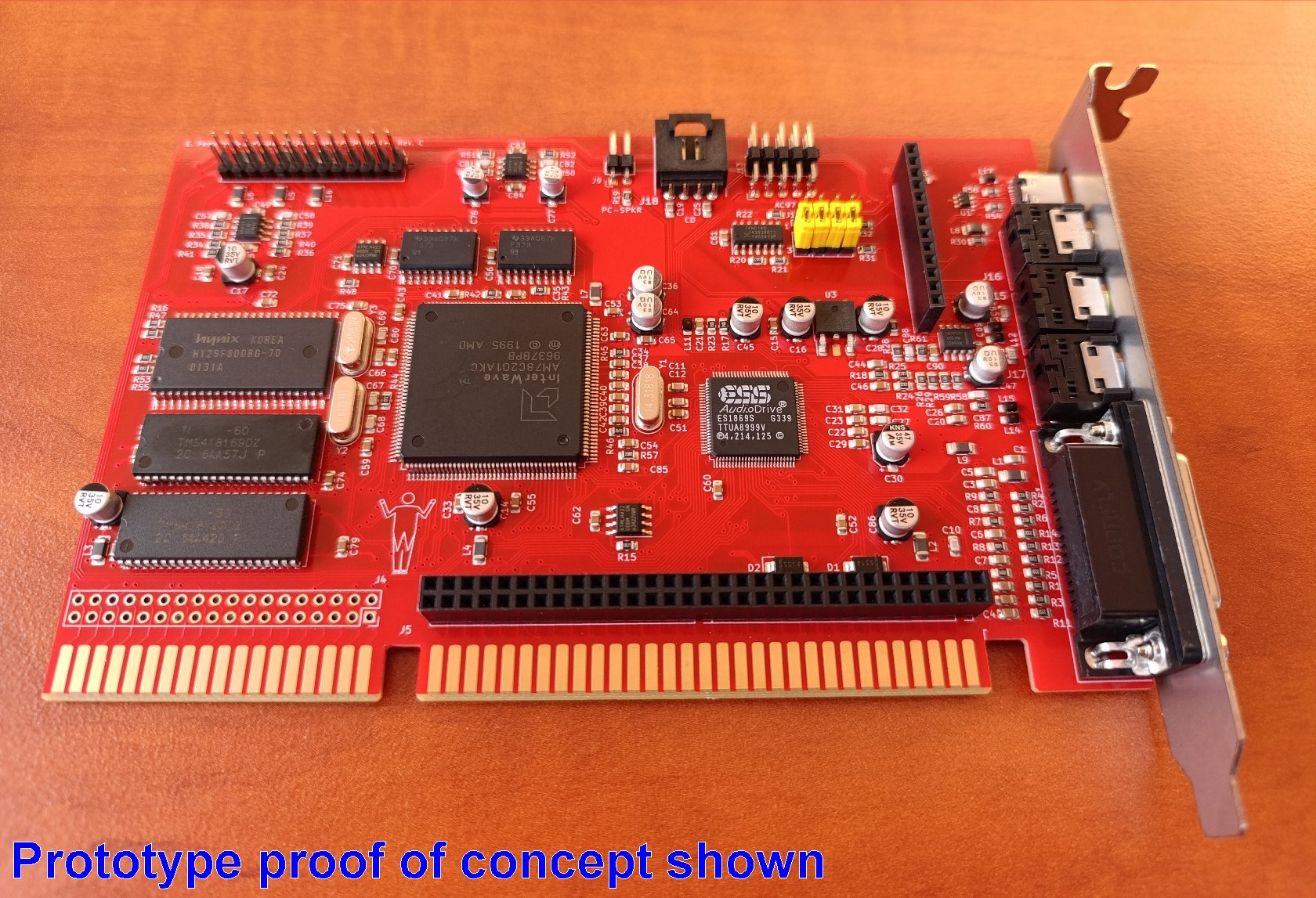
Inspired by the original 90s GRAVIS ULTRASOUND EXTREME card the MK1869 XTREME is an ISA sound card based on the ESS ES1869 sound controller chip coupled with the AMD InterWave for native Gravis UltraSound support . Everything is working together on a compact and optimized 4-layer PCB design offering great performance and verstatity for your retro sound needs. |
 |
ESS ES1869 chip for compatibility with SoundBlaster (PRO), AdLib and ESS native software. Distinctive Characteristics • AdLib, Sound Blaster and Sound Blaster PRO compatible for DOS (with SB ADPCM support) • Windows drivers with up to 48khz sampling rate • High-quality, OPL3 superset ESFM music synthesizer • MIDI port - compatible with MPU-401 UART mode • Integrated Spatializer 3-D audio effects processor • Integrated dual game port • 16-bit stereo ADC and DAC • Programmable independent sample rates from 4 kHz to 48.0 kHz for record and playback • Full-Duplex operation for simultaneous record and playback • Drivers for Microsoft® Windows™ 3.1x , 9x, ME, NT4 and IBM OS/2 • Meets PC 97/PC 98 and WHQL specifications _ |
|
|
AMD InterWave chip for native compatibility with Gravis UltraSound PnP software (included are the standard 1MB InterWave ROM bank and 8MB of RAM soldered directly on board). Distinctive Characteristics • 32-voice stereo wavetable synthesizer • Integrated effects processor • Up to 32 channels of digital mixing • Stereo 16-bit audiophile codec with IMA ADPCM 4:1 compression/decompression • MPC-compliant analog mixer • Supports multiple standards: — MPU-401 — MPC2, MPC3 — General MIDI — Microsoft® Windows®95, DirectSound™* — Windows 3.x API, Win32 API* — Miles AIL API* — HMI SOS API* — UltraSound* — Lucas Arts iMUSE API* * Appropriate software drivers required _ |
|
|
ISA expansion header for PCMIDI addon |
|
|
USB-C port for future expansion usage - specs for expansion creation will be freely available |
|
|
Both sound chips can be initialized (or not) and used independently according to user's needs |
 |
 |
ESFM playback showcase by pc-sound-legacy |
|
|
|
(Ultrasound PnP) GUS PnP playback showcase by pc-sound-legacy |
|

 MK1869
XTREME Jumper Settings
MK1869
XTREME Jumper Settings
 |
MIDI Routing control block Allows the configuration of which MPU device controls which MIDI port. When PCMIDI addon is installed a dual MPU setup can be created. J10 = Wavetable Header selector J11 = Gameport MIDI-OUT selector J12 = MIDI OUT jack selector J19 = Gameport MIDI-IN selector  Jumper installed in positions
1+2 : port controlled by PCMIDI MPU Jumper installed in positions
2+3 : port controlled by ESS MPU Jumper installed in positions
1+2 : port controlled by PCMIDI MPU Jumper installed in positions
2+3 : port controlled by ESS MPU  All 3 MIDI connections (wavetable
header/jack/gameport) can be used at the same time with every
possible combo of ESS/PCMIDI MPU. All 3 MIDI connections (wavetable
header/jack/gameport) can be used at the same time with every
possible combo of ESS/PCMIDI MPU. default setting shown: all ports
controlled by ESS MPU default setting shown: all ports
controlled by ESS MPU |
|
|
optional PCMIDI addon and future expansion connections |
|
|
Wavetable header connetor |
|
|
PC Speaker connector |
|
|
CD-ROM audio connector |
|
|
AC'97 header connector (MIC is only accessible via this connector) |
|
|
USB-C connector - activated by a future expansion board(s) |
MK1869
XTREME Driver Downloads|
|
The MK1869
XTREME has 2 sound chips onboard: the ESS ES1869 and the AMD
InterWave. So 2 sets of drivers (or Unisound that can initialize
both) are needed to fully initialize the card (same as with the
original GUS EXTREME or OrpheusII). The sound output of
each chip is independent so you have the option to only initialize
the one you want - this option exists in case there is some specific
user case for it. The sound output of
each chip is independent so you have the option to only initialize
the one you want - this option exists in case there is some specific
user case for it. |
|
|
For best results
remember to MUTE all InterWave inputs on the Windows InterWave
mixer application (MIC, Line-IN, CD-IN etc) since they are not
used at all on the card. Muting these sources can lead to better output quality. ULTASND.ZIP for DOS is already
configured to have these sources muted. |
| Chip Model | Driver Type | Version | Download | Release Notes |
|
ES1869 |
DOS |
|
 |
Note #1 |
| Unisound homepage |
|
|
Note #2 | |
| Windows 3.1x |
|
|
Installation Manual Note #3 |
|
| AudioRack
for Windows 3.1x (also acts as the mixer application for win3x) |
|
|
Manual | |
| Windows 9x (VXD drivers) |
|
|
- | |
| Windows 9x modded (VXD drivers) |
|
|
Note #4 | |
| AudioRack for Windows 9.x |
|
|
Manual | |
| Windows NT 4.0 |
|
|
Installation Manual | |
| OS/2 |
|
|
|
|
| Updated ES1869 Miles Sound System drivers |
|
|
|
|
 Sierra audio drivers patch for ESS186x chips by Nemesis/DivByZero Sierra audio drivers patch for ESS186x chips by Nemesis/DivByZero |
|
|
|
| Chip Model | Driver Type | Version | Download | Release Notes |
 AMD
InterWave AMD
InterWave |
DOS , preinstalled ULTRASND.ZIP |
|
|
Note #7 |
| Unisound homepage |
|
|
Note #8 | |
| Windows 3.1x |
|
|
||
| Windows 9x / ME |
|
|
||
| Windows NT 4.0 |
|
|
||
| UltraMID for DOS |
|
|
||
| Floppy disk images of all of the above DOS/Win drivers |
|
|
||
| CD-ROM image of the latest GUS PnP driver CD , useful for complete 9x install |
|
 |
VOGONS drivers mirror | |
| Official AMD InterWave game patch information webpage 04/02/1997 mirror |
|
 |
|
|
| Jazz Jackrabbit v1.1 Shareware version - Prepatched for InterWave , for testing |
|
|
|
 #1 |
If the system BIOS is a PnP one there is a good chance that ESSCFG will completely ignore user settings for IRQ/DMA/MPU and will display a message about adjusting them via the BIOS - something that most of the times is not even possible. There are 2 options in this case: a. Edit ESS.BAT amd add an exclamation mark at the end of the ESSCFG command, for example: C:\ESS\ESSCFG.EXE /A:220 /I:5 /D:1 /E:0 /B:330 /J:E ! b. download UNISOUND, edit ESS.BAT to disable ESSCFG and enable UNISOUND instead. |
|
#2 |
A great replacement driver by JazeFox. Please read the included unisound.txt for more info. /x3D0 switch makes sure that the ESS 1869 "3D sound enhancements" are OFF Since Unisound v0.82a, AuxB volume
control is supported as a separated option.This is important because AuxB is used by the WT header on the MK1869. The AuxB control in Unisound is the /VBxx option and it works like this: if /VBxx is not used /VFxx option will control FM, onboard WT and WT header. if /VBxx is specified, /VFxx will control FM and onboard WT volume and /VBxx will control WT header volume separately. Example uses with MK1869: /VF00 /VB90 will mute onboard
WT and will put external WT board to 90% volume. /VF80 /VB00 will mute external
WT and will put onboard WT to 80% volume. |
|
#3 |
Please note that the Windows 3.1x instalation program will add ESSCFG and ESSVOL lines at the top of your AUTOEXEC.BAT , manually remove them or change them according to your own preferences. Windows 3.1x driver needs the card to be initialized in DOS prior to usage. |
|
#4 |
In most systems we tested the native ESS1869 VXD drivers have buggy DOS support under Windows98/SE (at least) which result in many games not being able to detect Adlib/FM capabilities. Use these modded drivers to revert the main driver file to the ESS1868 version which does not exhibit this bug. There is no downside other than "3D sound enhancement" functions also getting disabled. Both VXD driver versions use a SETUP program to easily install them and will remove any existing drivers prior to installation making changing between versions easy. |
|
#5 |
For games that use the MILES SOUND SYSTEM it is possible to use updated ESS drivers that support the ES1869 and offer better sample playback quality than the SB/SBPRO drivers. AUDIODRV.DIG is the updated driver for Digital sound playback ESFM.MDI is the updated driver for native ESFM/MIDI playback (please notice that it depends on the game if it uses the ESFM driver or it actually has tracks that can take advantage of it) Simply copy yhe files from ESS_M36B.zip in the directory where the game stores it's *.DIG and *.MDI files. Newer Miles Sound System versions will automatically pick them up and you will get the the extra options for Digital Audio and MIDI driver screens. For older Miles Sound System versions that do not automatically add drivers in selection screens you will need to replace a driver file with AUDIODRV.DIG renamed to the same name as the driver you are replacing. For example let's assume that you want to replace a game's old ES688 driver named ADRV688.DIG with the new ES1869 driver, simple rename AUDIODRV.DIG to ADRV688.DIG , replace the old driver file and in the Digital Sound selection screen chose the Audiodrive ES688 driver. (the same method applies to ESFM.MDI driver replacements)  Special thanks to Joseph_Joestar
@VOGONS for the MSS info and research! Rincewind42's list of DOS games
that offer native ESFM support: HERE Special thanks to Joseph_Joestar
@VOGONS for the MSS info and research! Rincewind42's list of DOS games
that offer native ESFM support: HERE |
|
#6 |
Sierra
audio driver patch - Fix mixer volumes on ESS1868/1869 devices A new game audio driver patch for Sierra games made by Nemesis/DivByZero , it fixes the mixer settings being altered by the Sierra audio drivers. Please visit the VOGONS release thread for more information about it. The package offered here contains the original Python script patch and a portable/compiled version of it for people that do not want to install the Python environement just for this. Please read the HOW-TO-USE.TXT in the archive for usage instructions. Games tested so far are: • Gabriel Knight 1 • Police Quest 4 • Quest for Glory 4 • Space Quest 4 • Space Quest 5 • Space Quest 6 • Space Quest 6 Demo • The Incredible Machine 2 More Sierra titles are supported (like Leisure Suite Larry 6 , Freddy Pharkas and so on) but they are currently untested. Once more feedback is received they will ve added to the list. Special thanks to Nemesis/DivByZero for
creating this patch! |
 #7 |
* v2 update info: muted unused
inputs on InterWave in mixer app, changes saved to IW.INI and
applied on initialization |
|
#8 |
Gravis UltraSound
PnP Unisound notes: You can use Unisound to initialize the UltraSound PnP portion of the MK1869 XTREME but please remember that you will still need a working \UTLRASND directory in your system that will containt the GUS Classic patches, PREPGAME, ULTRAMID etc... So it is recommended to download and extract the pre-installed ULTRASND.ZIP driver in your hard drive and prior to running Unisound use the SET command to let the system know about the ULTRASND path, example command is : SET ULTRADIR=C:\ULTRASND Ofcourse you will also need to pass to the SET ULTRASND= variable the resources you want Unisound to allocate , see Unisound.TXT for more info on using the program. |
|
#9 |
Official AMD InterWave game patch information webpage
04/02/1997 mirror Contains official patches for the following titles: • Bioforge • Crusader No Remorse • Dark Forces • Fade To Black • Full Throttle • INCA II • Magic Carpet II • MechWarrior II • MechWarrior II: Ghost Bear Legion • Steel Panthers • Tie Fighter |
|
#10 |
Jazz Jackrabbit v1.1 Shareware version - Prepatched
for InterWave This is a convenience package to test Gravis UltraSound playback under DOS - it's the shareware version of Jazz Jackrabbit v1.1 with PREPGAME already applied. If you initialize the MK1869 XTREME with ULTRASND.ZIP (or Unisound) then running JAZZ.EXE will playback sound from the Gravis part of the card. Self-extract DOS archive + installer fit on a single 1.44mb floppy disk - just like EPIC released back in the day. |
 |
When PC Speaker passthrough is connected it has the potential to introduce noise in the sound output of the card - precautions have been taken to minimize any noise polution but it ultimately depends on the age/state/design of the host system. Therefore it is recommended to mute the speaker input (for ESSVOL the /P0 argument will mute the input). During boot time the PC Speaker input is automatically activated and audible - so no boot codes are missed. The PC Speaker connector is polarized,
if you get no boot code beeps then put the speaker cable the
other way around. |
 |
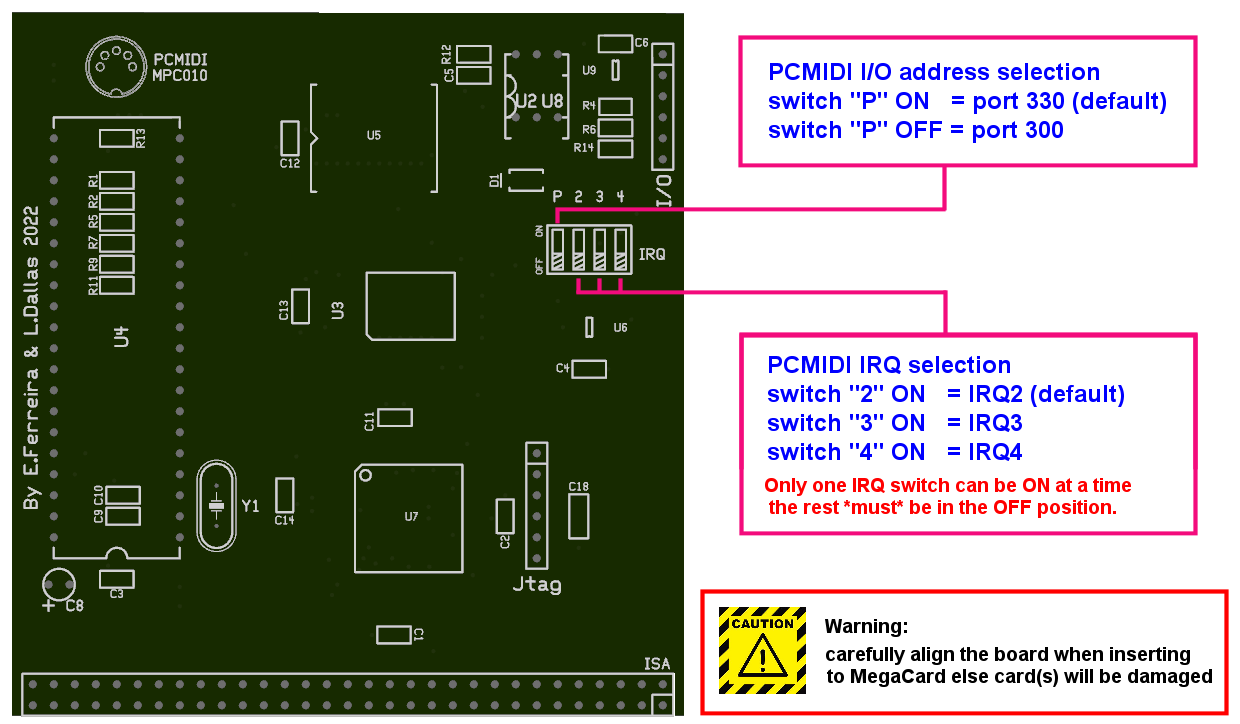
Please visit the PCMIDI Website for downloads and info as the PCMIDI addon shares the same chipset/firmware with the standalone ISA PCMIDI card. Any patches/drivers/info also applies to the addon - with the exception of the form factor and hardware configuration jumpers which are explained in the diagram below: 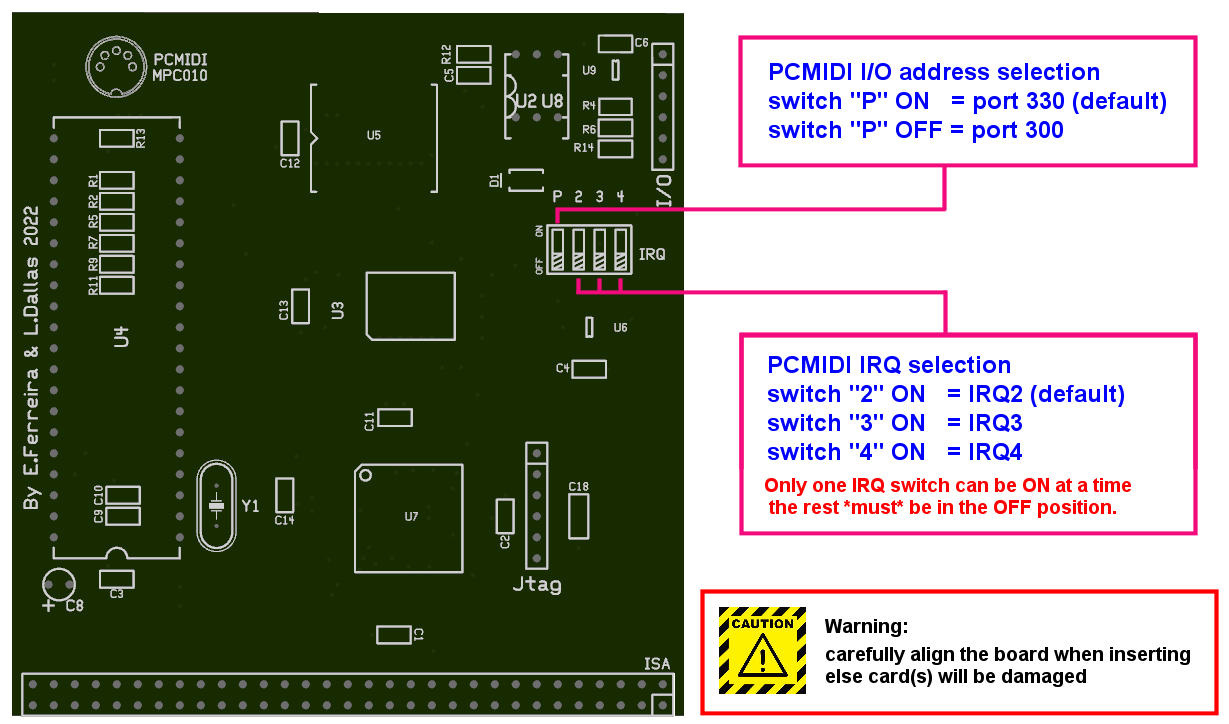 DIP switch settings , click on image for full version. Please keep in mind that PCMIDI is not a PnP
device, if it is not detected then it needs to be manually installed
via the "Add New Hardware Wizard" and then selecting
the "Roland MPU-401 device. Make sure the jumper settings
match the port/irq of the driver options. |
 |
On MK1869 there are provisions for upgradeability in the form on ISA bus passthrough headers and a MIDI/SOUND/USB I/O header. The USB-C port at the back of the card is currently unused and can be activated if needed with some upcoming expansion. Currently PCMIDI addon uses the 8bit ISA passthrough + MIDI I/O to achieve integration with the main soundcard. We have some thoughts about future expansions as well but it will be possible for anyone to create any expansion they want - ISA and I/O header info and specs will be added soon to this place for download. |
FAQ| |
1.
My NEC XR-385 wavetable daughterboard is too loud and I cannot
create good mixer settings for use with it. The NEC XR-385 wavetable daughterboard is created for use with a Japanese line of computers from NEC and as such it uses difffent specifications for it's output - it is almost 3x louder than what a normal pc soundcard expects. MK1869 XTREME is finetuned to be used with proper PC wavetable boards and as such adjusting the XR-385 volume to be balanced with the rest of audio sources is not possible. Simply put because of it's volume output the XR-385 is not supported for use with the XTREME. Tiido over at VOGONS
forum offers a service to convert a XR-385 to a proper PC
wavetable board - the converted board works perfectly with MK1869
XTREME or any other soundcard out there.Alternatively you can use a CHiLL interface from Serdashop
to convert the XR385 to an external midi device, the interface
has hardware volume attenuation jumpers for loud wavetable boards. |
| |
2.
I have troubles allocating resources for my MK1869 XTREME card,
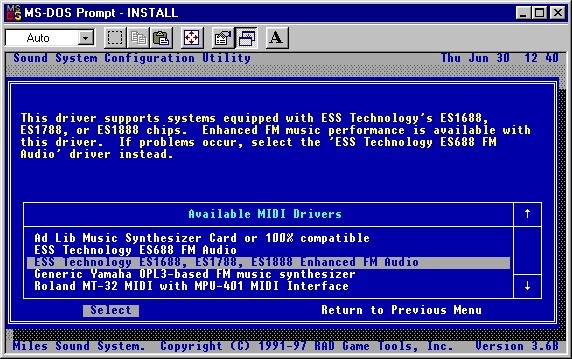
it seems selected IRQ or DMA do not work. This might happen if your system has a PnP BIOS. What helps is allocating the needed resources for use with "LEGACY ISA" option, this is typically found in the "PNP/PCI CONFIGURATION" page of your system BIOS. Notice in the shot below how we have set the needed IRQ and DMA options for "LEGACY ISA" usage - they are basically what the MK1869 XTREME needs: IRQ2/9 for PCMIDI MPU (if the
PCMIDI addon is installed)IRQ5 and DMA1 for the ESS chip
to provide SB/SBPRO (assuming default driver values)IRQ7 and DMA7 for the InterWave
chip to provide GUS (assuming defaut ULTRASND.ZIP values) Changing these settings should help reserve the needed resources for the MK1869 XTREME. In rare cases you might also need to remove all extra cards from your system, boot it once and verify that resources are good to go and then add any extra cards you had installed as this will force the BIOS to re-configure itself. |
| |
3.
DOOM II has some weird instruments in music playback when Gravis
UltraSound is used This is a known bug for UltraSound cards, basically the game driver bugs out when 1mb or more ram is installed (yes even on GUS Classic 1MB cards this happens) and loads the wrong samples. Explanation is located here. Solutions to this issue can be downloaded  HERE (mirror)
and HERE
(mirror) . HERE (mirror)
and HERE
(mirror) . |
| |
4.
After installing the Gravis UltraSound drivers the Win9x tray
mixer launches the UltraSound mixer , how do I get back the old
volume control tray mixer? This change is made automatically by the Gravis software installation. To revert back to the original tray mixer open "UltraSound Properties" (located in START MENU -> Gravis -> UltraSound Properties ) , uncheck the "Use UltraSound Mixer instead of Windows Volume Control" and press APPLY, the change will be instantaneous.  |
| |
5. Under
win9x I cannot allocate the resources I want for GUS PnP and/or
ES1869 even though I reserved resources in BIOS This could happen on an ACPI system and all you could manually allocate are resources that are less than ideal for ISA soundcards. The solution to the issue is to disable the "Get IRQ table using ACPI BIOS" option. Instructions to find the option follow: • Open "Device Manager" navigate to "System Components" and select "PCI-Bus". • In properties of the PCI-Bus deactivate option "Get IRQ table using ACPI BIOS" (untick the box). • Click "OK" and restart your computer - hopefuly on next reboot you will be able to allocate the desired resources.  |
| |
6. I have
an ASUS P5A motherboard and I get all sorts of issues with Windows
9x drivers Please go to BIOS -> CHIPSET FEATURES page and DISABLE the "Delayed Transaction" item , this should clear up the issues. This is a "feature" of this specific motherboard. |
| |
7. Where
can I find more info and patches for the Gravis UltraSound portion
of the card?Official AMD InterWave game
patch information webpage 04/02/1997 mirrorHow
to use Gravis UltraSound with Tomb RaiderThe
Gravis UltraSound Archiveshttp://dk.toastednet.org/GUS/https://gona.mactar.hu/GRAVIS/if you know of any more web resources
please let us know so they can be added to the list |
 Order information You
can order a MK1869 XTREME soundcard by filling the form HERE
Order information You
can order a MK1869 XTREME soundcard by filling the form HERE 31-MAR-2026: MK1869
XTREME sound card is sold out! Thanks again for the support!
First come - first
served! Cards will be shipped by order of payment made.
31-MAR-2026: MK1869
XTREME sound card is sold out! Thanks again for the support!
First come - first
served! Cards will be shipped by order of payment made. Price for each card shipped via
registered airmail is is 330eur when paid as "friends &
family" with PayPal/IBAN
Each card comes complete with a stainless steel bracket , PCMIDI
addon daughterboard and a 3.5mm-to-midi cable ready to
use. Packages are sent via tracked
airmail service provided by Greek/Portugal Postal Services, already
included in the price.IMPORTANT NOTE: US shipping is
possible again using UPS Expedited service with an additional
shipping cost of 35eur.Contact information
Price for each card shipped via
registered airmail is is 330eur when paid as "friends &
family" with PayPal/IBAN
Each card comes complete with a stainless steel bracket , PCMIDI
addon daughterboard and a 3.5mm-to-midi cable ready to
use. Packages are sent via tracked
airmail service provided by Greek/Portugal Postal Services, already
included in the price.IMPORTANT NOTE: US shipping is
possible again using UPS Expedited service with an additional
shipping cost of 35eur.Contact information Contact
Form
Contact
Form Join the Discord Server
  |
Back to Index |